What website meta descriptions are, where Google shows them and how to write one that earns more clicks from search results.
Having covered website title tags in detail in our previous article, we now turn to meta descriptions and what they do.
A meta description is an HTML element that summarises the content of a web page. This short description is shown on the search results page under the page title and URL. Meta descriptions can affect click-through rate (CTR), which means they can influence whether someone decides to visit your website. To write the best page titles and meta descriptions, you need to make them unique and make sure they are neither too short nor too long.
In this article we explain how to write appealing meta descriptions and how to add them to your website.
Meta descriptions appear in your page's code, and this is what it looks like:
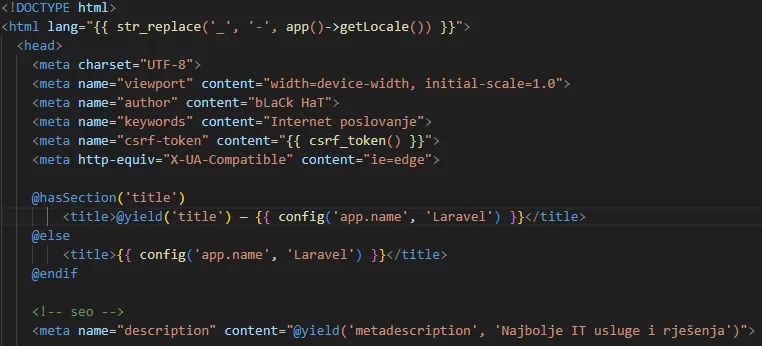
Image description: you can find the meta description in the page's HTML.
Most content management systems (CMS) let you add and edit meta descriptions by typing into a specific field. Once you've entered it, the meta description should appear in search results and look like this:

Keep in mind that Google often rewrites meta descriptions that don't match people's search queries well.
According to Google, it uses meta descriptions, rich snippets and on-page content to decide which snippet to show on the SERP.
The meta description you wrote may also change depending on the search term someone uses. If you follow best practice for matching search intent, you'll have a better chance of Google using your description.
An effective meta description is like a good sales ad. It quickly tells readers what you offer and, with a good description, draws them to click through to your website. The goal is to improve your website's CTR with tempting meta descriptions, and more clicks mean more visitors to your page.
Meta descriptions aren't a direct SEO ranking factor. But they can affect rankings indirectly by driving a higher organic CTR for particular keywords.
Improve CTR,
Set your search result apart from competitors,
Help present your product or service,
And these are exactly the factors that can affect rankings indirectly.
Here are some best practices for meta descriptions:
A meta description is an HTML element that gives people and search engines a summary of a web page. It's best to keep your meta description to about 120 characters or fewer, so people on mobile and desktop can read all of it. The bad example above is 168 characters long; Google would shorten it in search results on both mobile and desktop.
- Use your target keyword
It's best to include your target keyword in your meta description. Meta descriptions don't directly affect rankings, but they can encourage people to click. That's especially true if you include the keyword someone is likely searching for and it matches their search intent.
- Use a clear call to action
Meta descriptions should encourage people to visit your page. The active voice can help. Here's an example of the active and the passive voice:
Active voice: Evelyn ate a piece of cake.
Passive voice: A piece of cake was eaten by Evelyn.
The active voice is more direct – the subject (Evelyn) performs the action expressed by the verb (eat). Using the active voice can save you characters and clearly tell people what they'll see if they click your page. The active voice inspires action, and action is the point of every call to action.
Consider phrases such as:
Learn more
Try it free
Find out more
Explore our services
Use a unique meta description for every page. That makes it easier for people to understand what each of your pages is about.
To write the best page titles and meta descriptions, make them unique, make sure they're neither too short nor too long, use specific keywords for each page and write for people, not robots. If you need a website built with unique meta titles and descriptions, get in touch with us.